
MWCustomProductBuilder
INTRODUCTION
The MWCustomProductBuilder, or MWCPB, is an application used to prepare the Company’s customized data for the downstream CAD add-ins or Standalone application.
MWCustomProductBuilder validates the Company’s supplied data for completeness and integrity, then properly formats and protects it by generating files that are saved in a specific location within the Company network.
The downstream CAD add-ins cannot start without customized data; Standalone application works but with some limitations.
MWCustomerProductBuilder is intended to be a Reseller only tool.
PREREQUIREMENTS
Before using the MWCustomProductBuilder application the Reseller is required to retrieve the following information:
- Customer Code: the 4-digit Company code.
- The desired name of the customized Client-Server Document Management System.
- A Link to a valid web page (the Company or Reseller homepage).
- The label of the web page link button.
- An email address (for support requests, Company or Reseller internal email).
- If the Company uses SolidWorks CAD Add-in it is required the Company SolidWorks Document Manager API Key code. See the Appendix at the bottom of this document for more detail.
- A .png image with the Company logo. It is suggested 300x300 pixel size.
- License Agreement (EULA) files if different from the default.
Most of the data above are visible or used inside the About of the Add-ins or Standalone application.
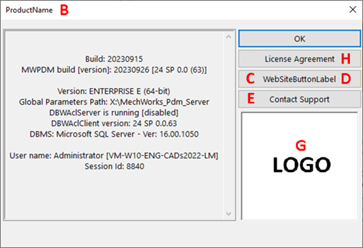
CREATE A COMPANY’S CUSTOMIZATION
A. Run on your local machine the MWCustomProductBuilder.exe.
B. Below is the login user interface. To login an internet connection must be available.
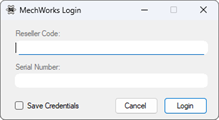
- Reseller code: the « R » + 3-digit Reseller code.
- Serial Number: Any 10-digits MechWorks valid serial number (the same credentials used by Resellers to login on to the MechWorks website reserved area. The application remembers the last used).
- Save Credentials flag: check it if you want to save the login credential on the local machine.
C. Fill the information in the Company Data tab:
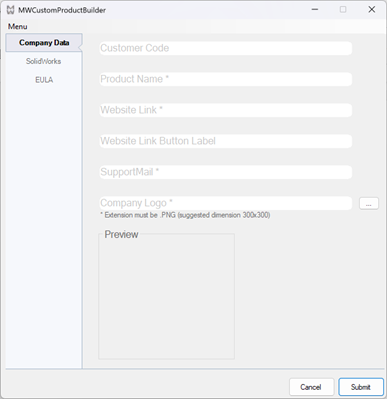
Customer Code and Website Link Button Label are not mandatory fields.
Note: In case the customization is used by a reseller the field must be left empty. If the Customer Code is left empty the Reseller implicitly becomes the owner.
D. If required, insert the SolidWorks Document Manager Key in the specific SolidWorks tab:
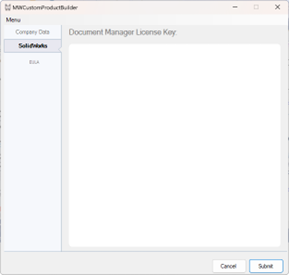
E. Move to EULA tab. By default, the MechWorks EULA is selected. If required, select a customized EULA file, extension must be .TXT.
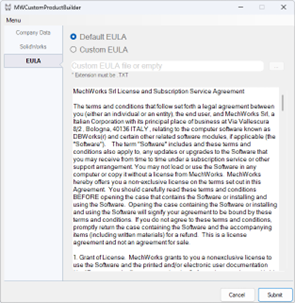
Note: IF the EULA.TXT file is empty no EULA will be available in the application About.
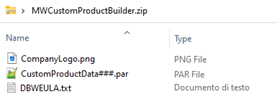
F. When all forms are filled out, click the SUBMIT button. The MWCustomProductBuilder application is closed and a ProductName.zip file is created in the same directory as the executable.
Inside the zip file:
- A bitmap containing the Company Logo.
- A DBWEULA.txt file containing the EULA
- An encrypted file called CustomerConfigurationData###.par containing:
-
- Document Manager Key extension if required.
- Customer Code.
- Customized PDM name.
- Link to company website.
- Website link button label
- E-mail to support.
EDIT AN EXISTING COMPANY’S CUSTOMIZATION
a. Run on your local machine the MWCustomProductBuilder.exe.
b. Below is the login user interface. To login an internet connection must be available.
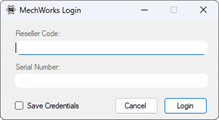
- Reseller code: the « R » + 3-digit Reseller code.
- Serial Number: Any 10-digits MechWorks valid serial number (the same credentials used by Resellers to login on to the MechWorks website reserved area. The application remembers the last used).
- Save Credentials flag: check it if you want to save the login credential on the local machine.
c. From the dropdown Menu select Edit:

d. A File Selection Box appears. Select the folder containing the Customer’s customization and confirm with the OK button. The customer’s data are loaded, all the forms are filled out and ready for editing.
COMPANY’S CUSTOMIZATION INSTALLATION
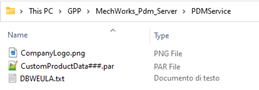
When the customization package is ready, install the MWPDM R24 or superior to the Company site following the instruction in the setup file. The setup creates a new empty folder named <GPP>\MechWorks_Pdm_Server\PDMservice.
a. Extract the ProductName.zip content to the folder <GPP>\MechWorks_Pdm_Server\PDMservice.
b. Run the MWPDM Standalone or a CAD add-in to validate the installation by checking the Add-ins or Standalone About. If an error is detected or an update is required in the customized data, follow the procedure in paragraph 5 to edit an existing Company’s customization.
APPENDIX
The SolidWorks Document Manager API license key (SDMLK) must be request by the Company to Dassault Systemes using SolidWorks Support WEB portal. The license key is free and available to Company currently under subscription.
The instructions are available following the below link:
https://www.solidworks.com/support/subscription/key-request/
After logged in the SolidWorks Support WEB portal the Company must follow the below indication:
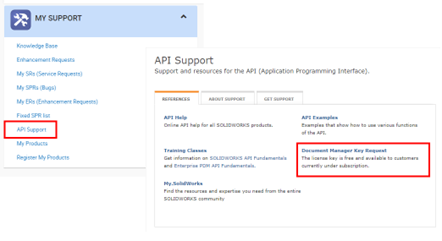
The Company must fill the “New Key Request Form” as below:
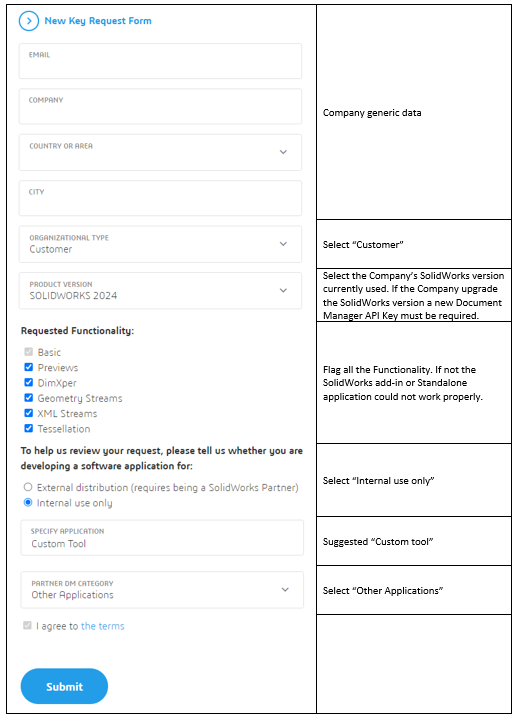
The SolidWorks Document Manager API license key is a long string with the below structure:
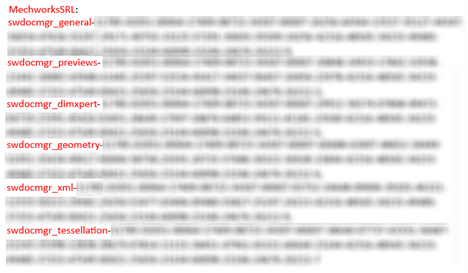
Be sure that the Company and all the six Functionalities strings are present, otherwise an error message is returned by the application.
Note: The SolidWorks Document Manager API license key must be updated every time the customization owner changes the major CAD release (for example from SolidWorks 2024 to SolidWorks 2025)
DOCUMENT HISTORY
| MWCPB Revision | Description | Author | Date |
| 1.0 | First emission | Loris Maccaferri | 31/01/2024 |
| 1.1 | Added EULA management | Loris Maccaferri | 10/08/2024 |
| 1.2 | Added a note in the Appendix concerning the SDMLK updated | Loris Maccaferri | 27/05/2025 |
| 2.0 | Edit mode and others improvement implemented | Loris Maccaferri | 06/08/2025 |